 KanjiMateFor iPhone and iPad
Read, write and remember kanji.
A kanji dictionary and study companion for JLPT N5 to N1. Look up all 2,230 kanji for free, watch how each one is written, and write it yourself with feedback. The whole N5 course is free to study, with no ads.
Free to download. Premium is one purchase, not a subscription. Requires iOS 26 or later.
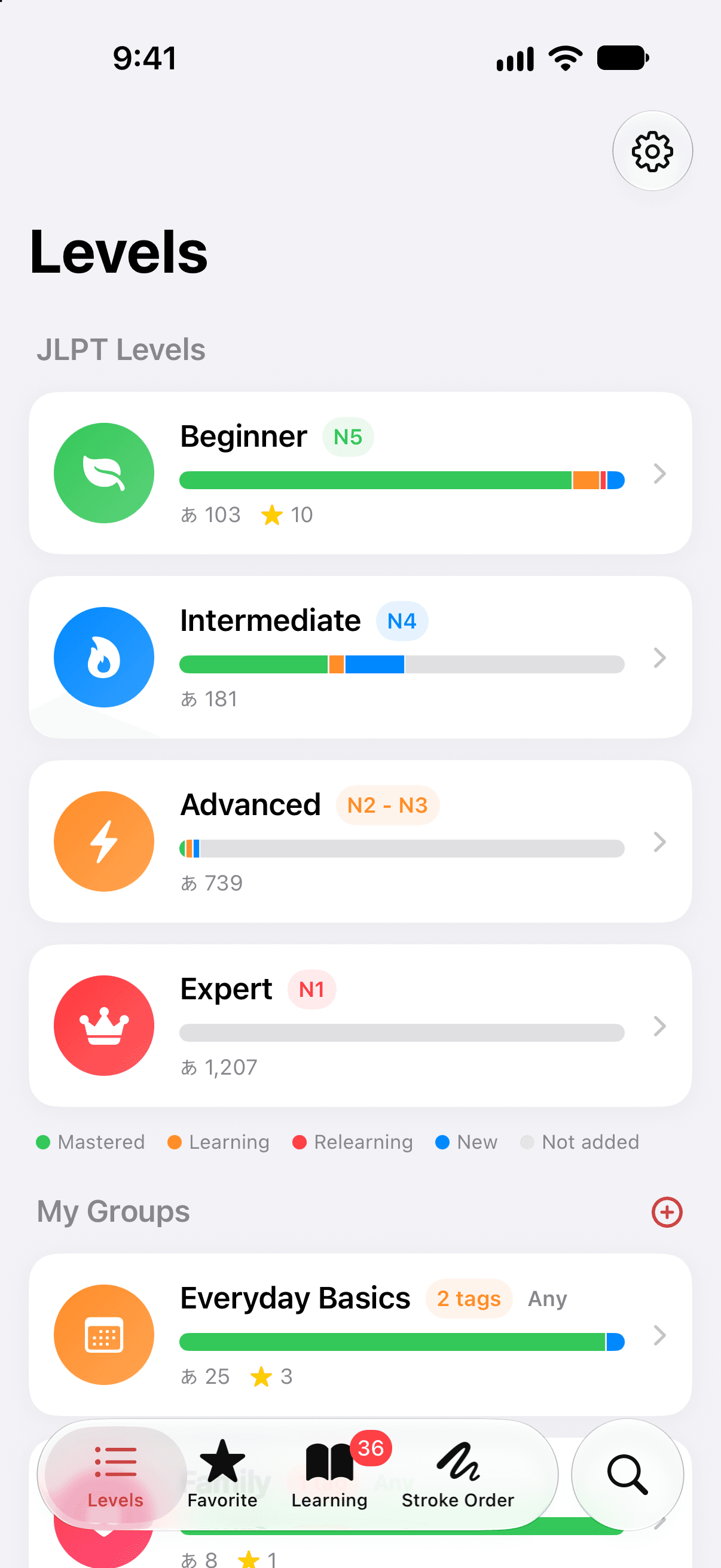
Learn 2,230 kanji, from JLPT N5 to N1.
KanjiMate arranges its kanji in the level groups commonly used for JLPT study. Every kanji at every level is free to look up. Studying with scheduled reviews is free for all of N5, and Premium adds the three levels above it.
- N5
Beginner
103 kanji
Free to look up
Free to study - N4
Intermediate
181 kanji
Free to look up
Study with Premium - N2–N3
Advanced
739 kanji
Free to look up
Study with Premium - N1
Expert
1,207 kanji
Free to look up
Study with Premium
Each bar is as long as its level is large. N1 alone holds more than half of the kanji.
Read every kanji in full.
An entry puts everything about one kanji on one page: what it means, how it is read, how it is written and built, and the words that use it. Nothing in the dictionary is locked.
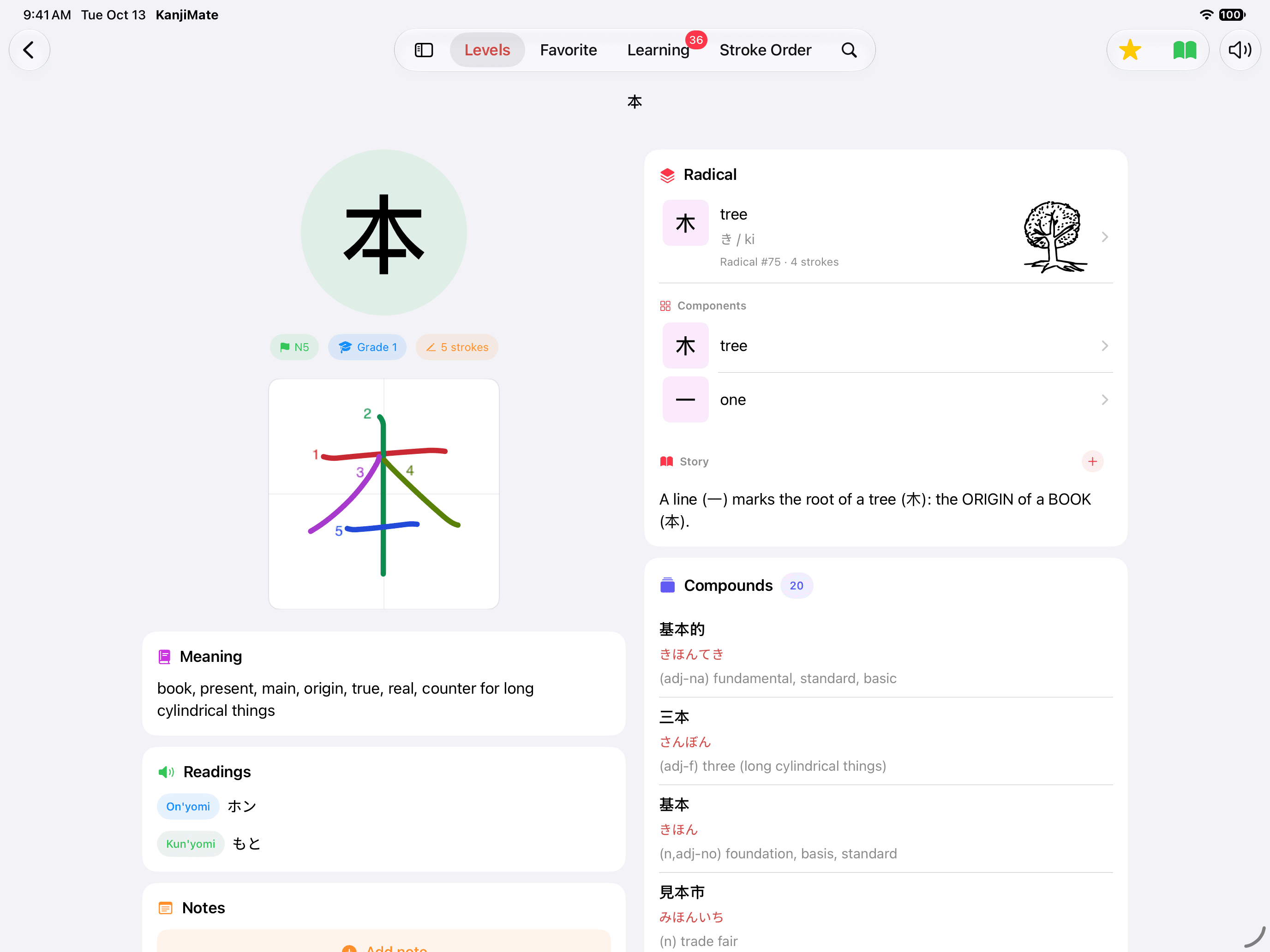
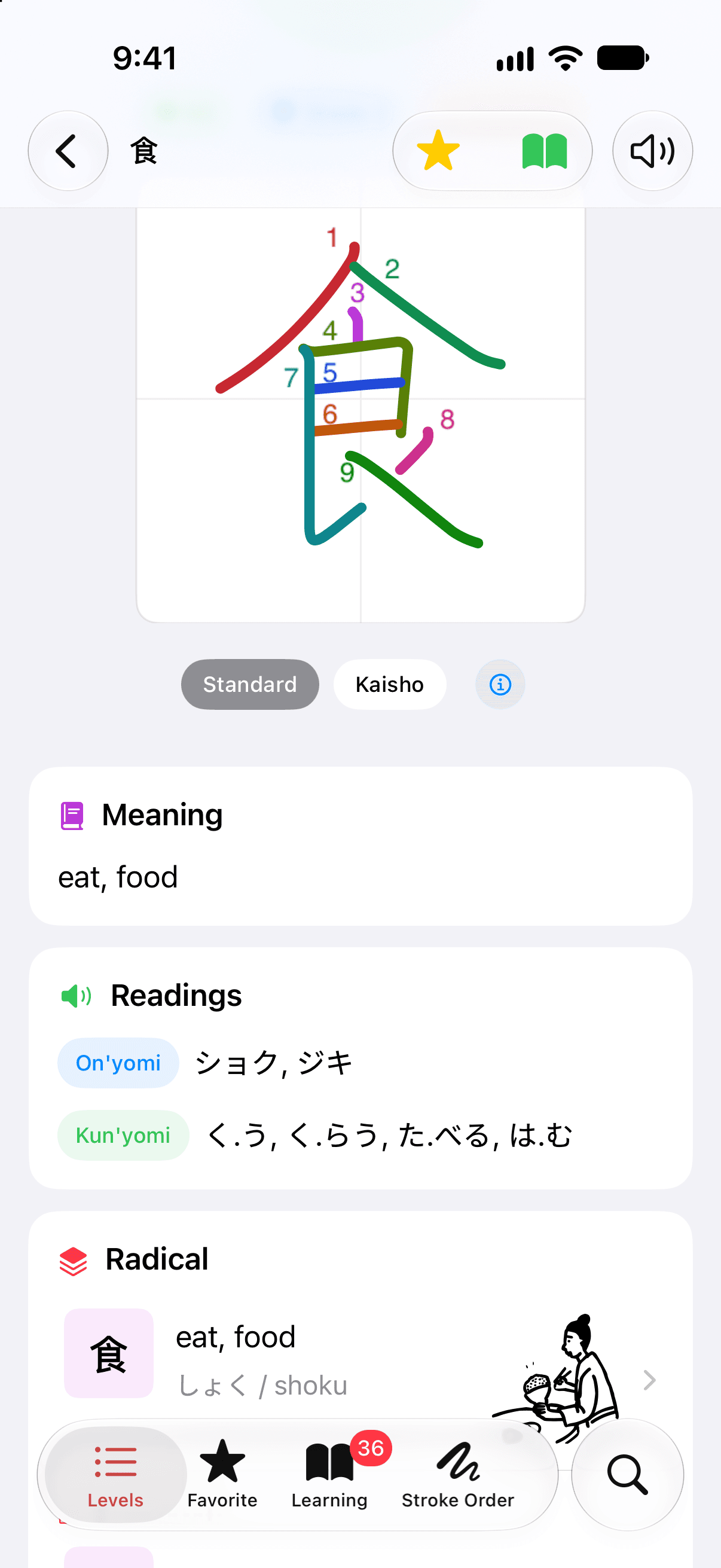
Meanings and readings
The meanings in English, then the on'yomi and kun'yomi readings. Tap the speaker to hear the kanji spoken.
A stroke diagram
Every stroke numbered and colored in the order it is written, beside the kanji's level, grade and stroke count.
Radical and components
The radical and the parts a kanji is built from. Tap a part to open it.
A story to remember it by
Every kanji comes with a short mnemonic story. Add your own when you have a better one.
Compounds and example sentences
Words that use the kanji, each with its reading and meaning, and sentences with their translations. Most entries have both.
Your notes and favorites
Keep a note on any kanji, and star the ones you want to find again in the Favorite tab.
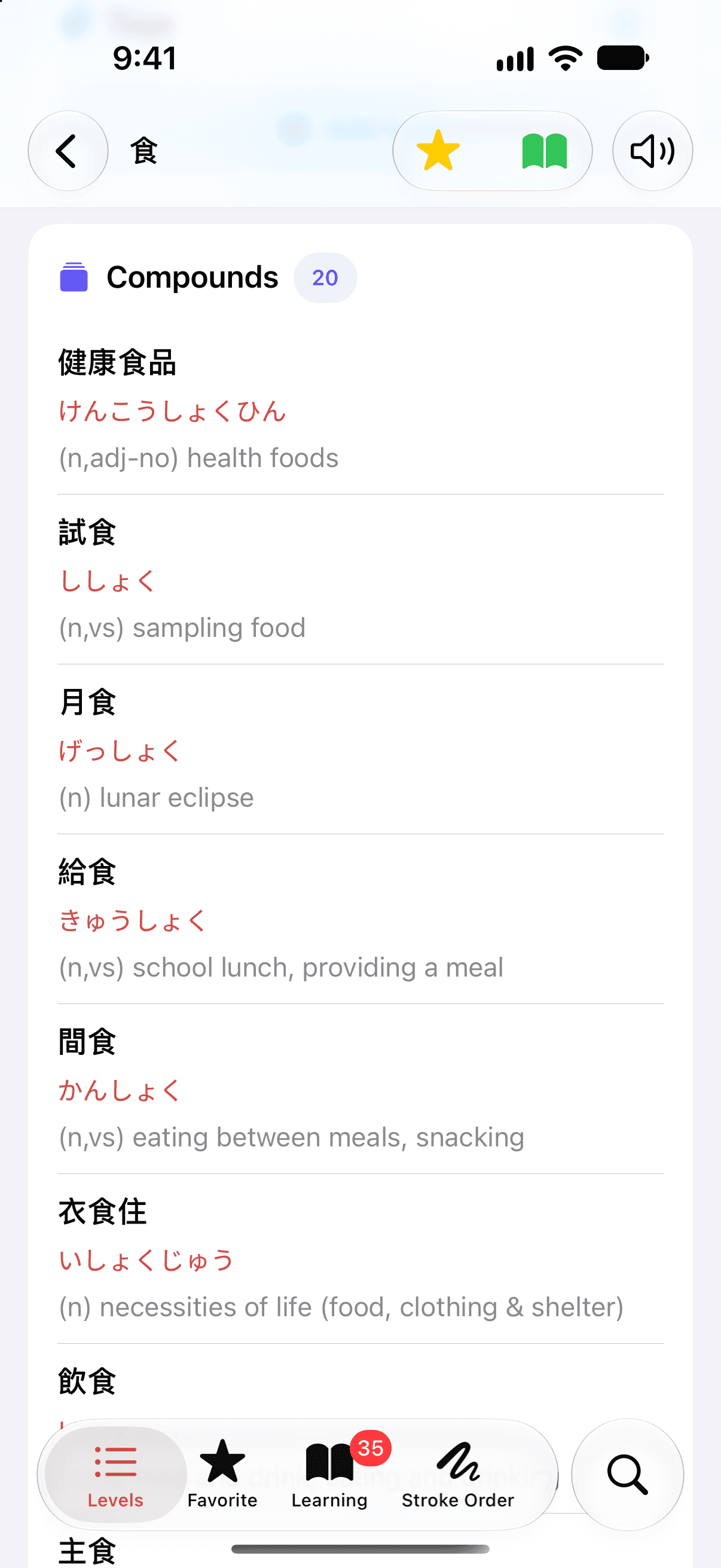
Vocabulary for each kanji
The Compounds card lists the words a kanji appears in. 食 has twenty of them.
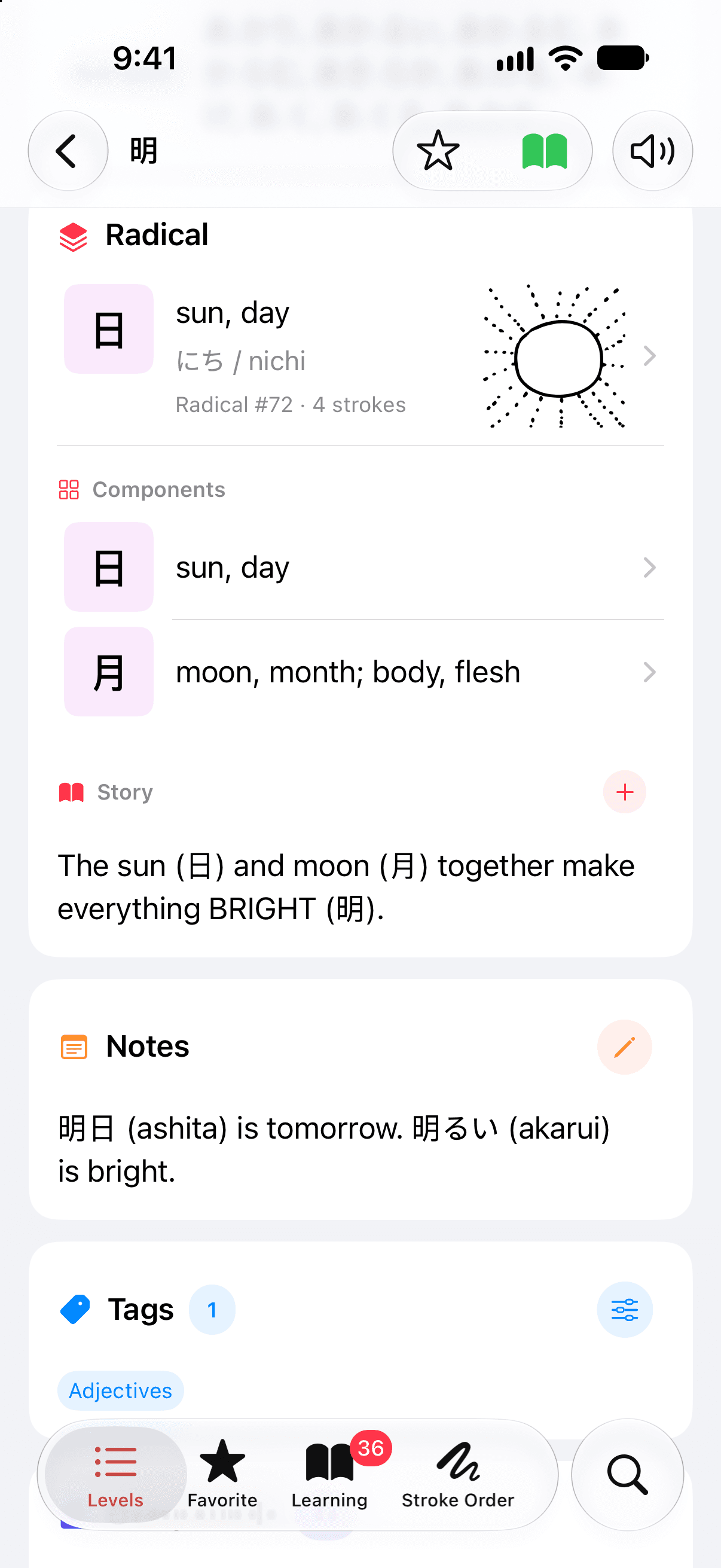
A kanji taken apart
明 is the sun beside the moon. Its radical, its components and its story share one card, with your own note and tags under it.
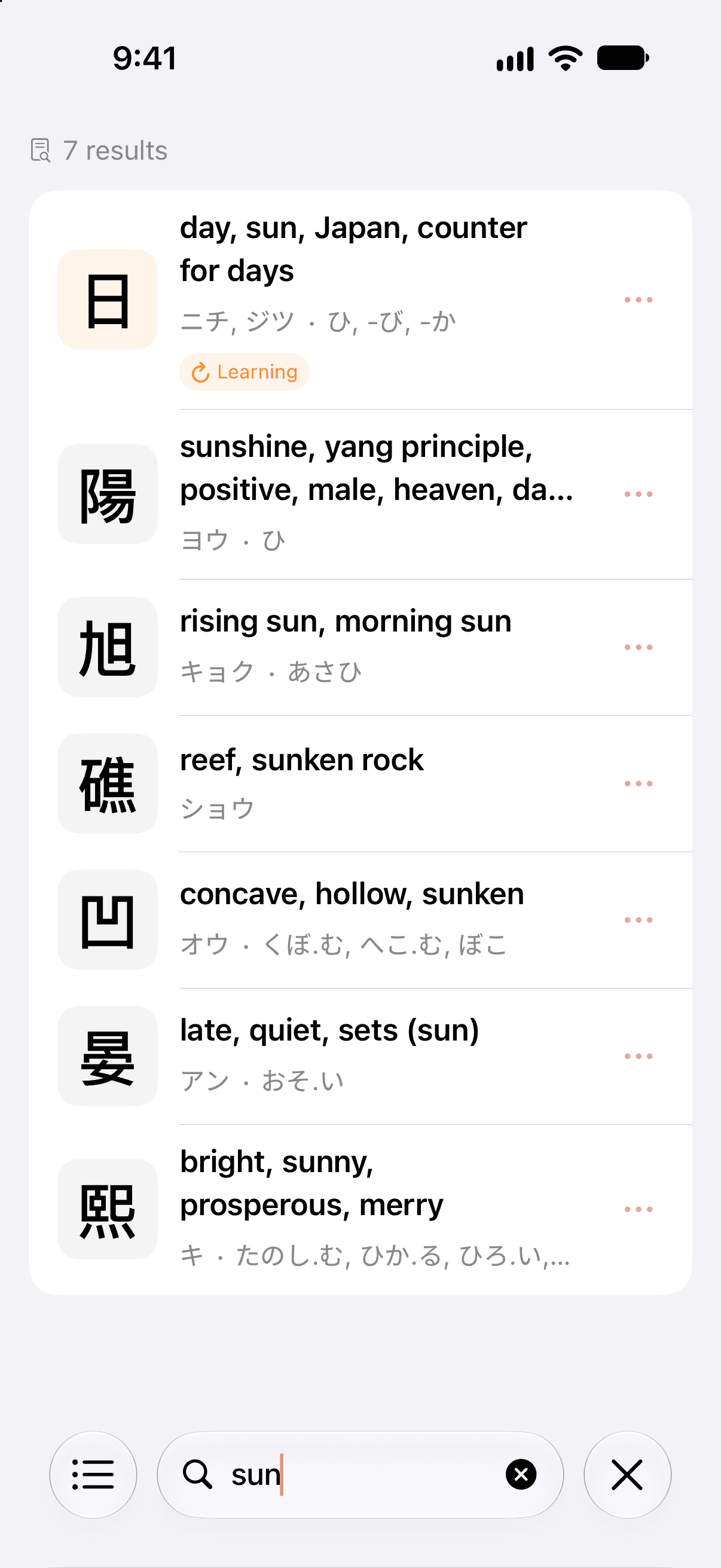
Search by character, meaning or reading
Type 漢, sun, かん or カン. Search looks through every kanji, its English meanings and its on and kun readings.
A whole level at a glance.
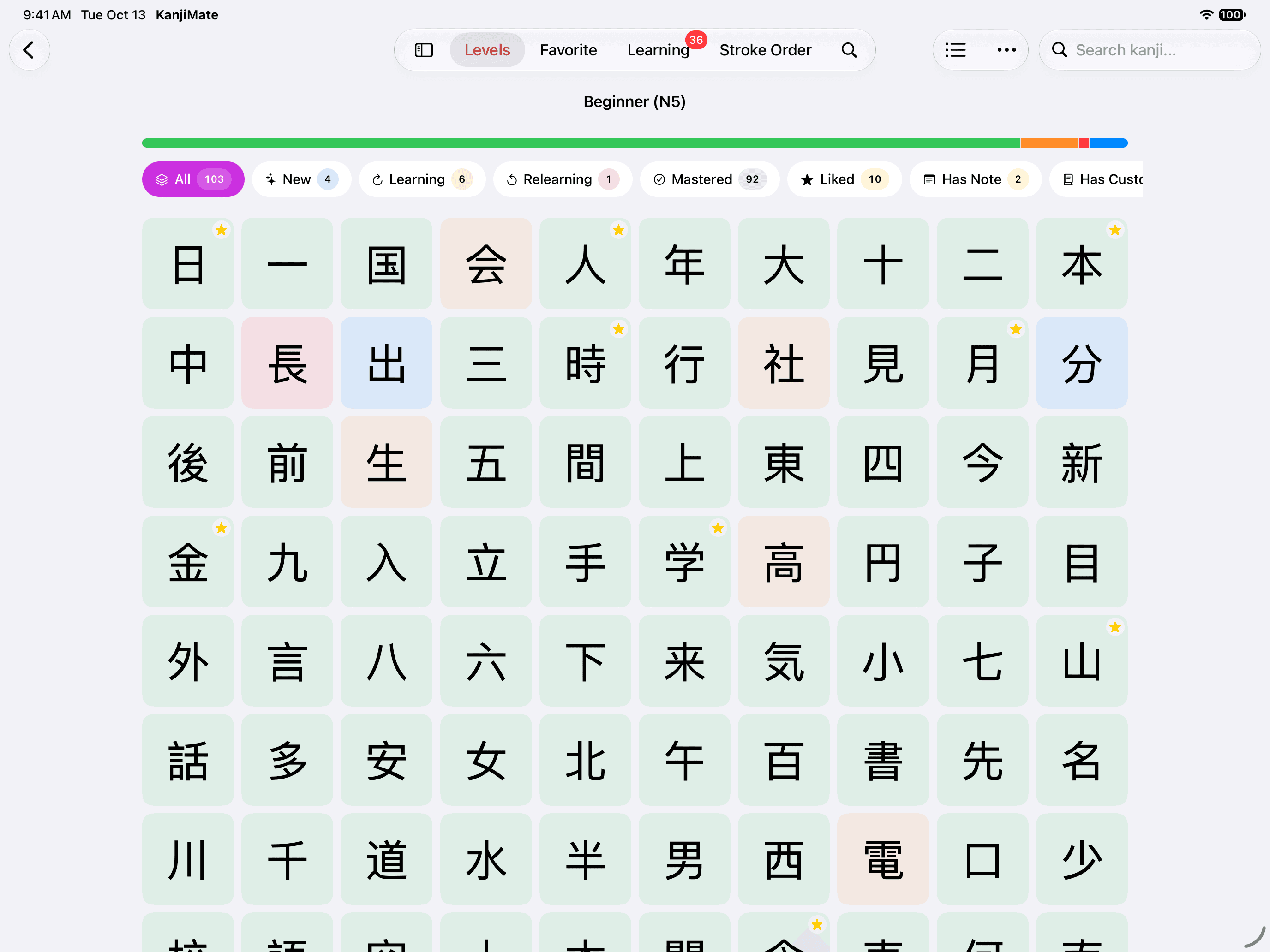
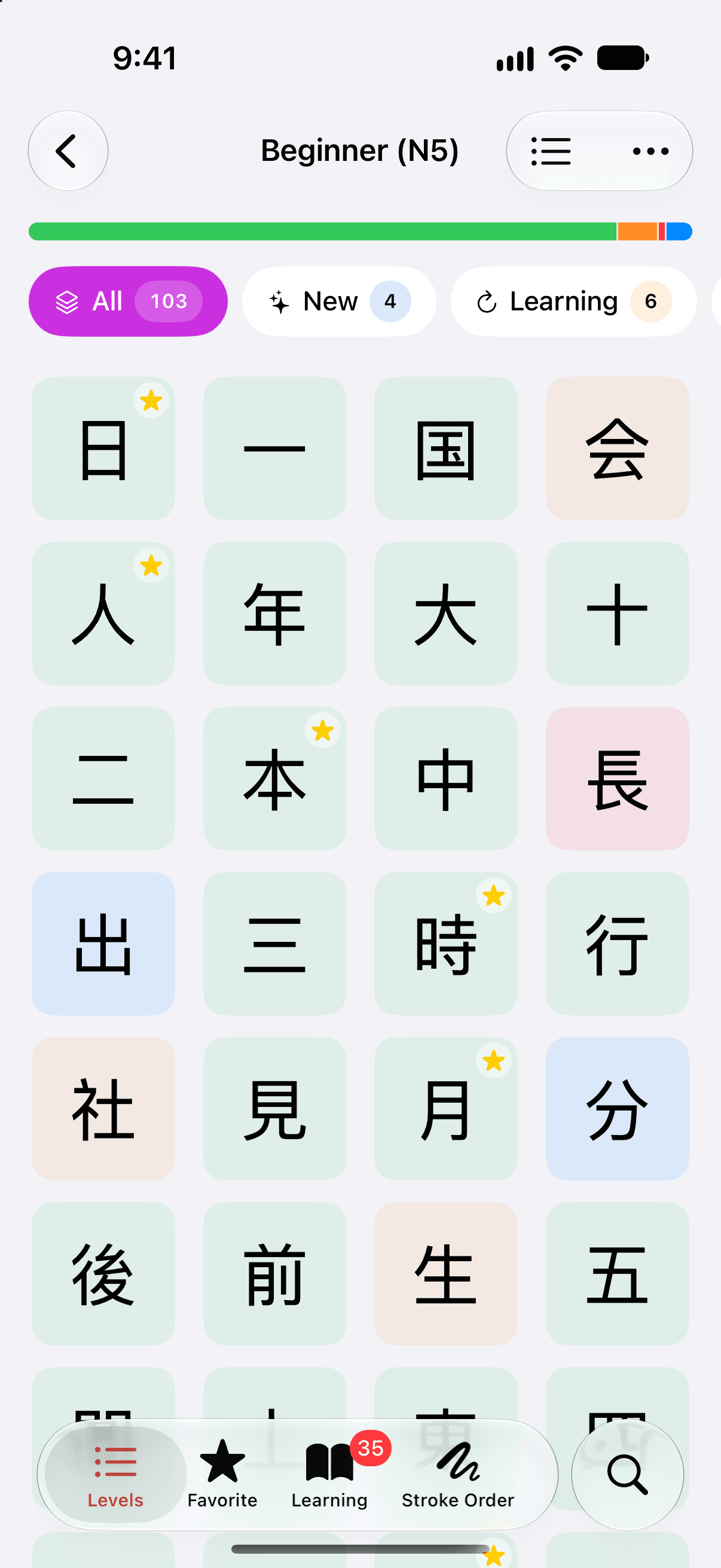
Open a level as a list, or switch it to a grid of kanji tiles. A tile's color is the state of its card, so you can see where a level stands without reading a word.
Long-press a tile to favorite the kanji or add it to your deck.
- New
- In your deck, not studied yet.
- Learning
- Seen for the first time lately. It comes back soon.
- Mastered
- It has moved on to spaced reviews.
- Relearning
- Forgotten in a review, and being learned again.
- Not added
- Not in your deck.
Write it, stroke by stroke.
Stroke order stays with you once your hand has done it. Watch a kanji being written, then write it yourself and see how close you came. Both are free, for the 2,230 kanji of the levels and thousands more.
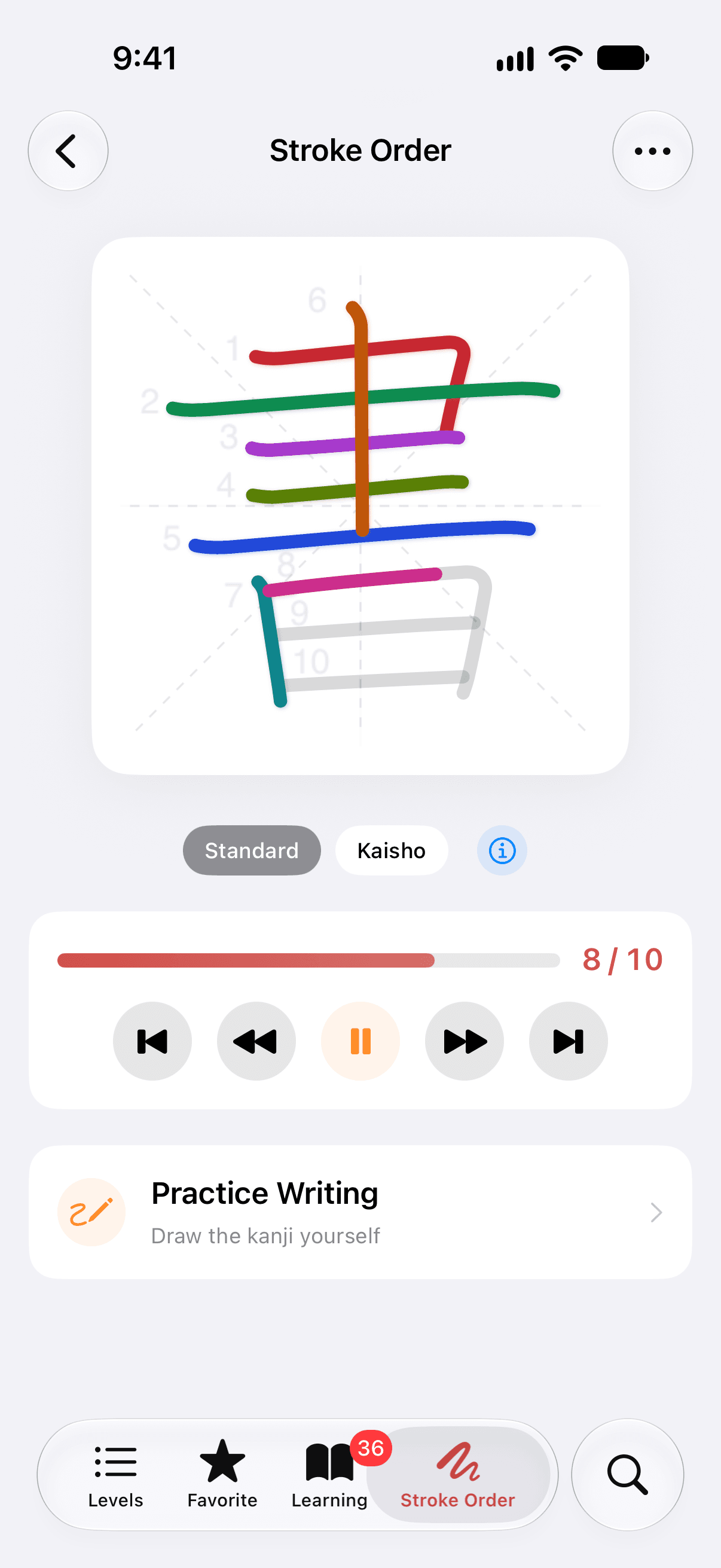
Kanji stroke order, one stroke at a time.
Stroke Animation writes the kanji in order, each stroke in its own color with its number beside it. Play it through, or step forward and back one stroke at a time.
Where a kanji has more than one accepted form, such as the traditional kaisho shape, you can switch between them.
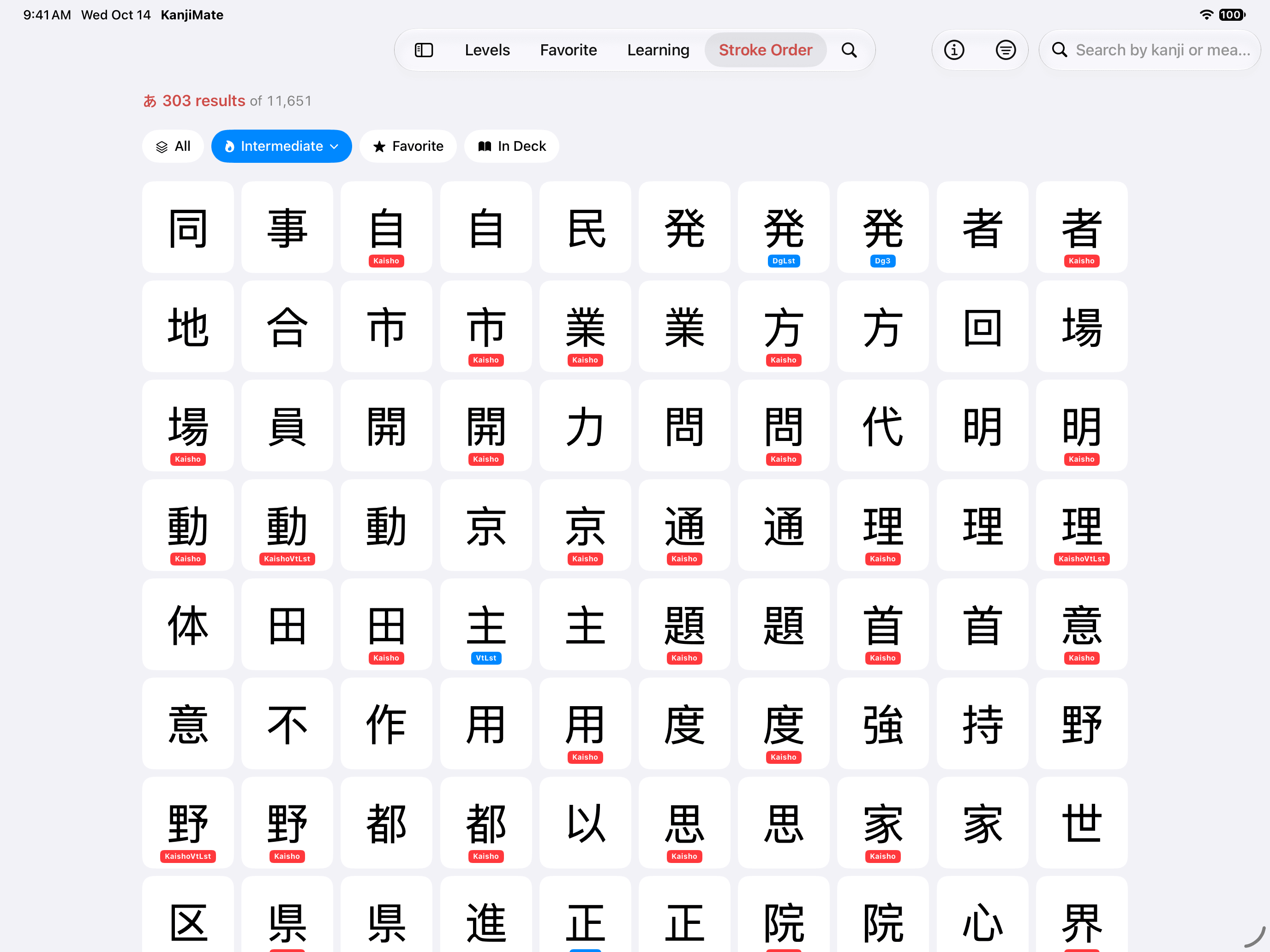
Stroke order beyond the levels.
The Stroke Order tab holds 11,651 stroke diagrams. They cover 6,421 kanji, nearly three times the 2,230 of the levels, along with hiragana and katakana.
Some characters appear more than once: 4,959 entries are variants, either another accepted shape, such as kaisho, or another accepted stroke order. Filter by level, favorites, your deck or a group, search by character, and open any entry in Stroke Animation or Practice Writing.
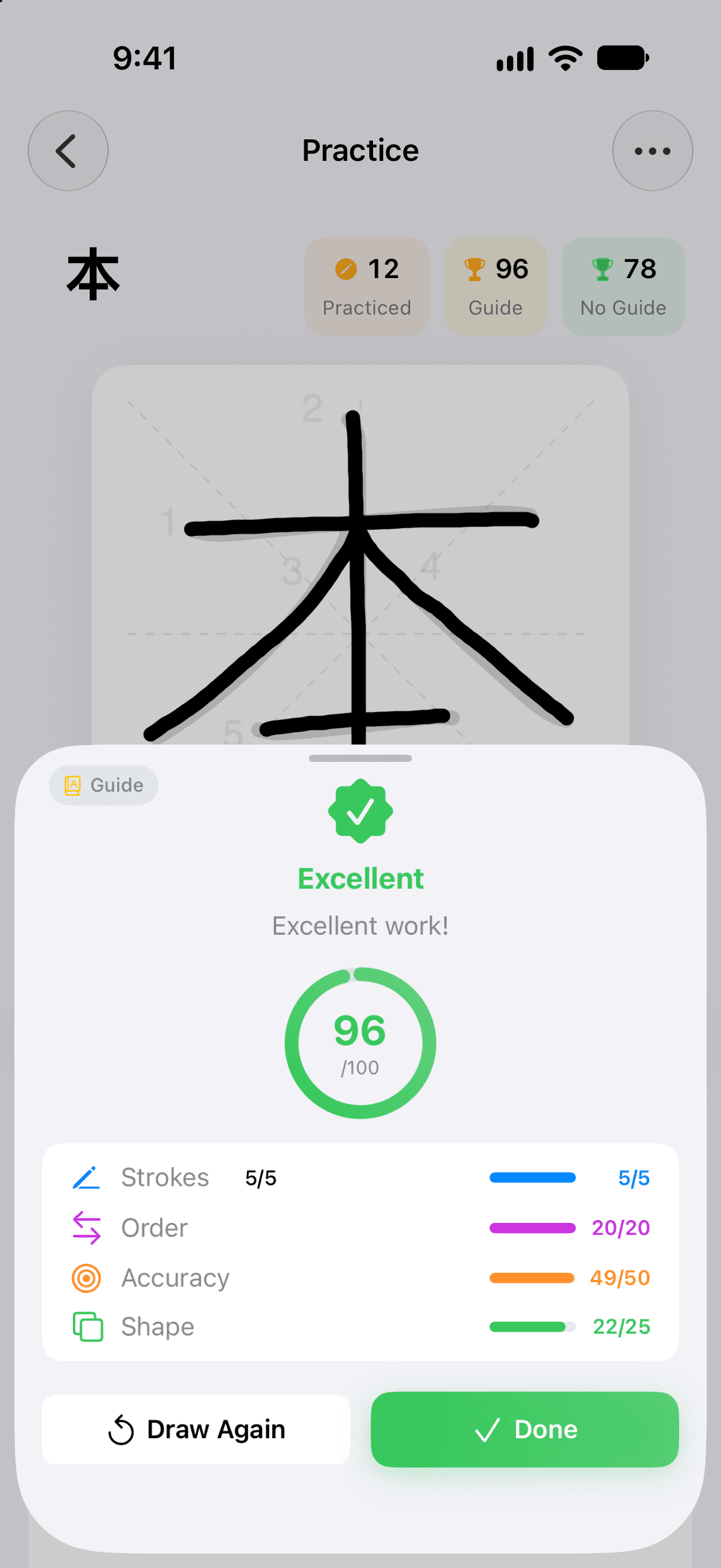
Japanese handwriting practice, scored out of 100.
Practice Writing gives you a canvas. Write the kanji on screen, tap Check, and the app scores what you wrote on four counts. Strokes that need work are marked on the canvas.
- Strokes5
- The right number of strokes.
- Order20
- Each stroke written in its turn.
- Accuracy50
- How closely each stroke follows the model.
- Shape25
- How well the whole character holds together.
Guide shows the character under your strokes, and Hint draws the stroke you are on. An attempt made with either is recorded as guided, so your best score with help and your best without it are kept apart.
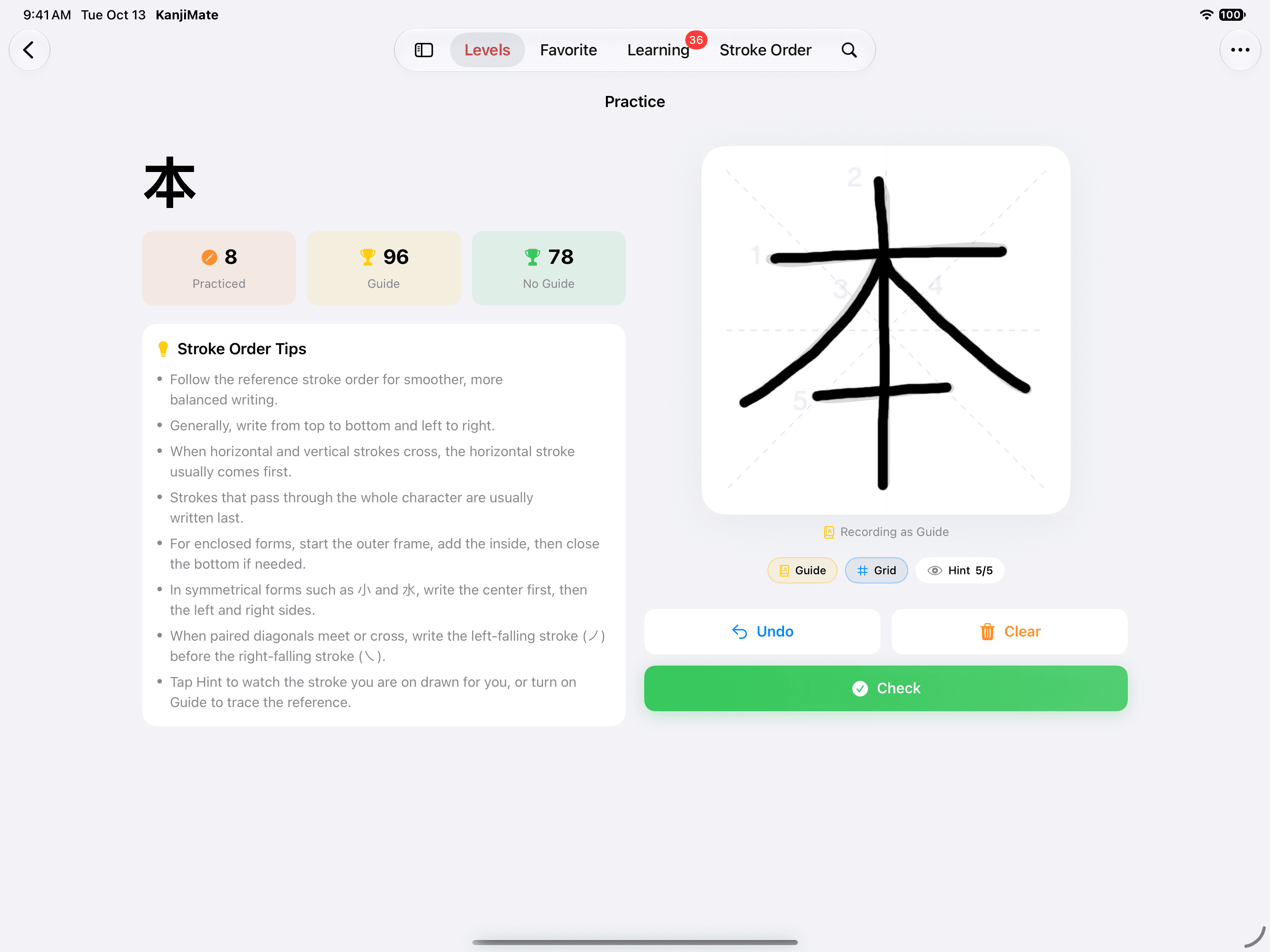
More room on iPad.
The canvas is larger on iPad. On a wide screen the character, your records and the stroke order tips stay on one side while you write on the other.
Remember it, with reviews that come back on time.
Add a kanji to your deck and it becomes a card. KanjiMate schedules every card with FSRS, a spaced repetition algorithm: a kanji you know well stays away for weeks, and one you keep missing comes back soon.
Kanji flashcards that know what is due.
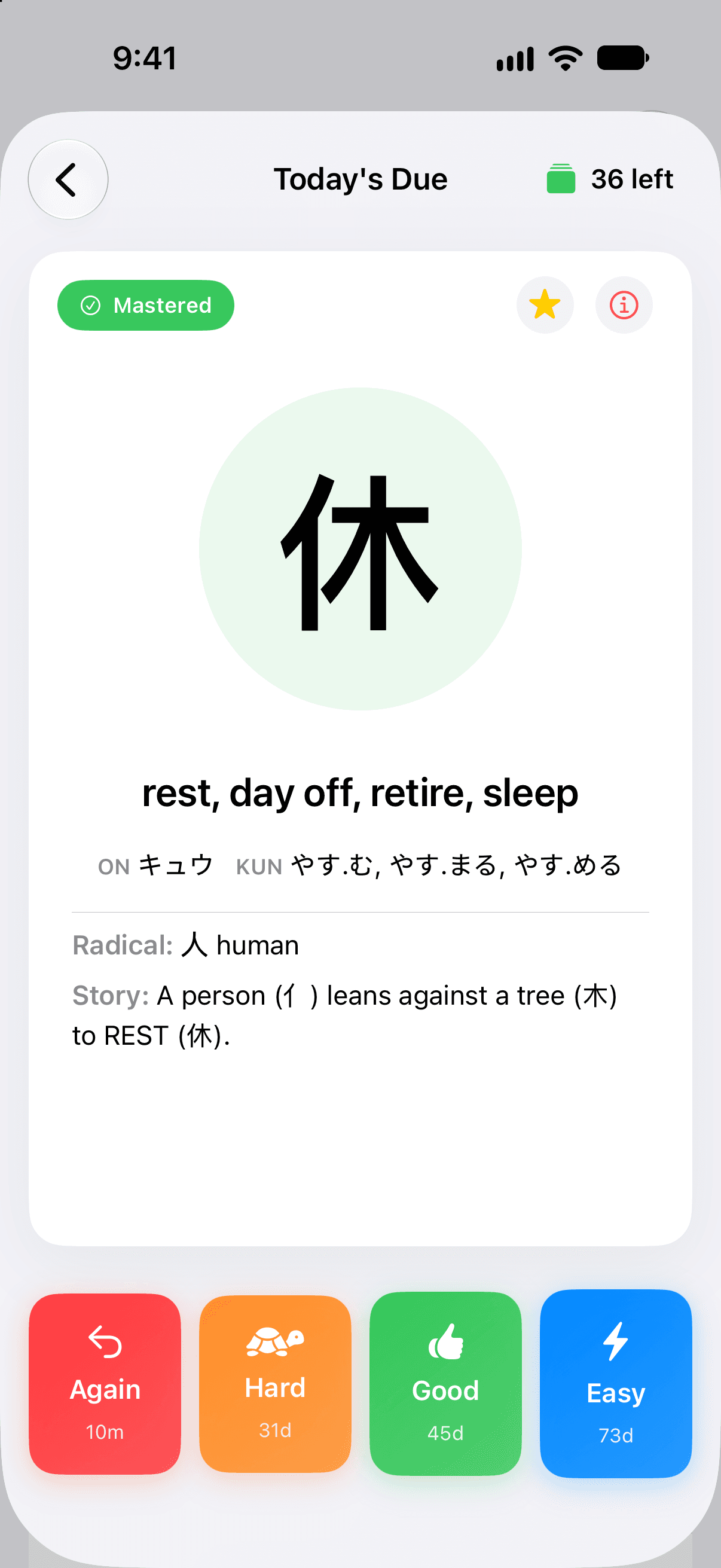
A flashcard asks for the meaning of a kanji, or for the kanji behind a meaning. Show the answer, then say how it went.
- Again10m
- You missed it.
- Hard31d
- You got there slowly.
- Good45d
- You knew it.
- Easy73d
- No hesitation.
Each button shows when that answer brings the card back. These four are for the card in the picture, one that is already Mastered. A new card starts with minutes and days.
Or review by quiz, or by hand.
Choose Flashcard, Quiz or Draw before a session. All three feed the same schedule.
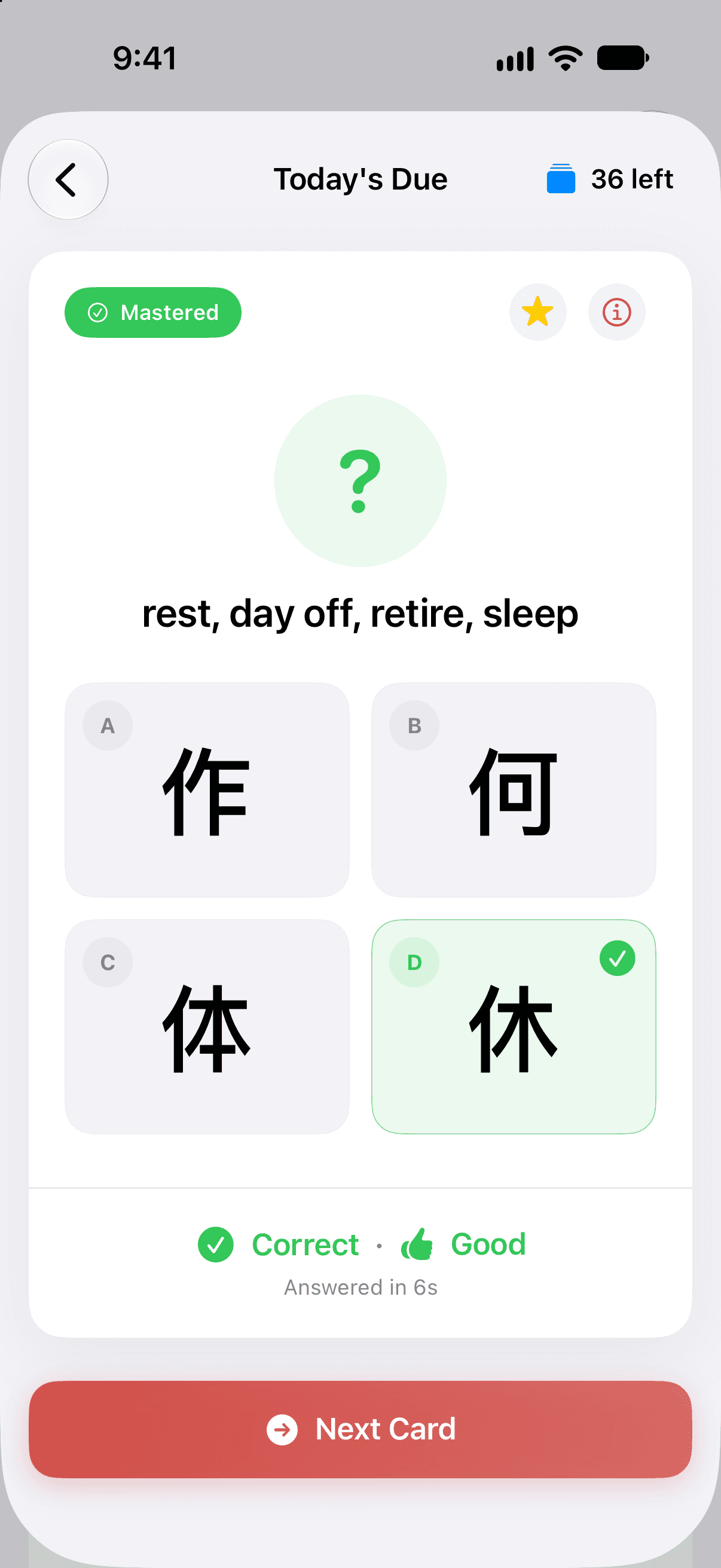
Quiz
Pick the right answer from up to four. A right answer is graded by how quickly you gave it, and a wrong one counts as Again.
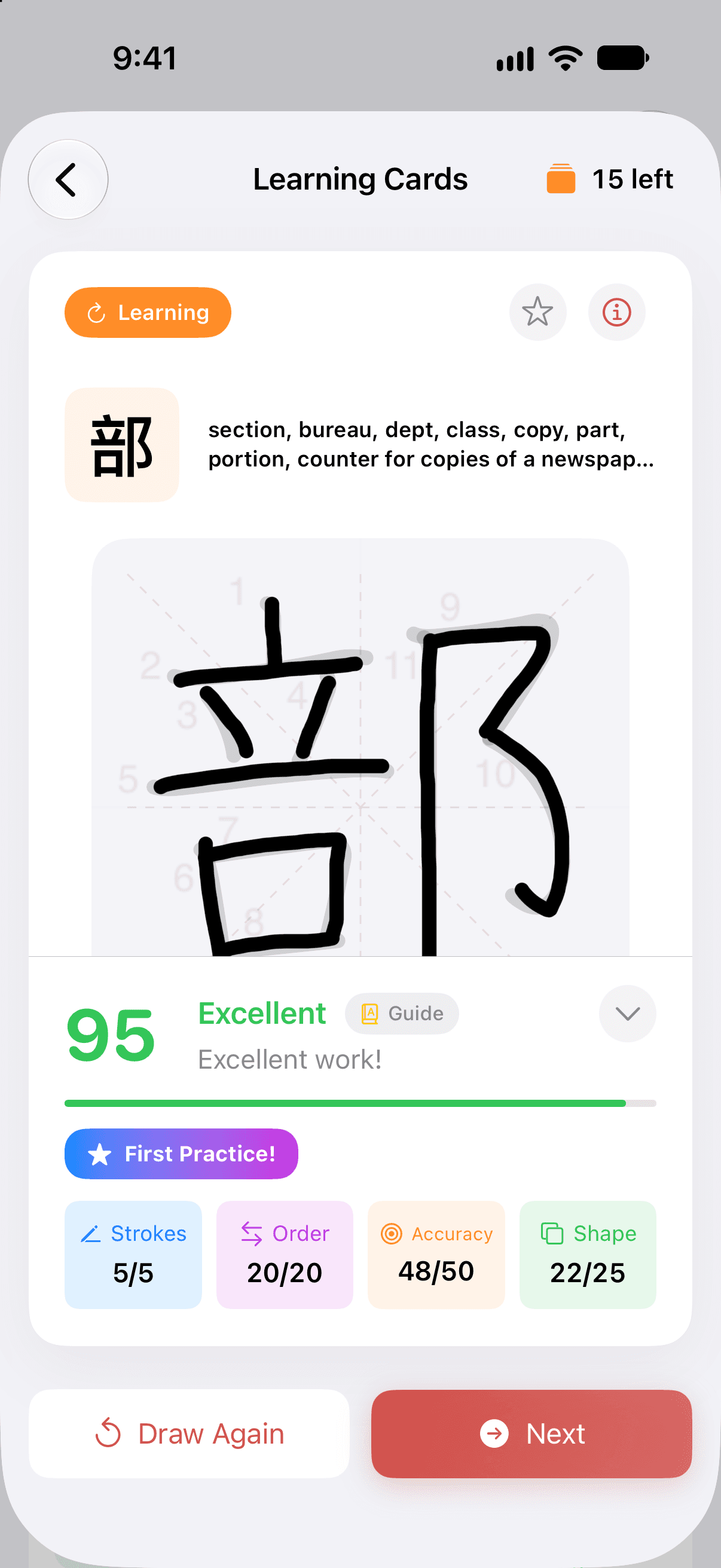
Draw
Write the kanji on screen. It is scored stroke by stroke, as in Practice Writing, and in a review the score becomes the grade.
Know what is due. Keep your streak.
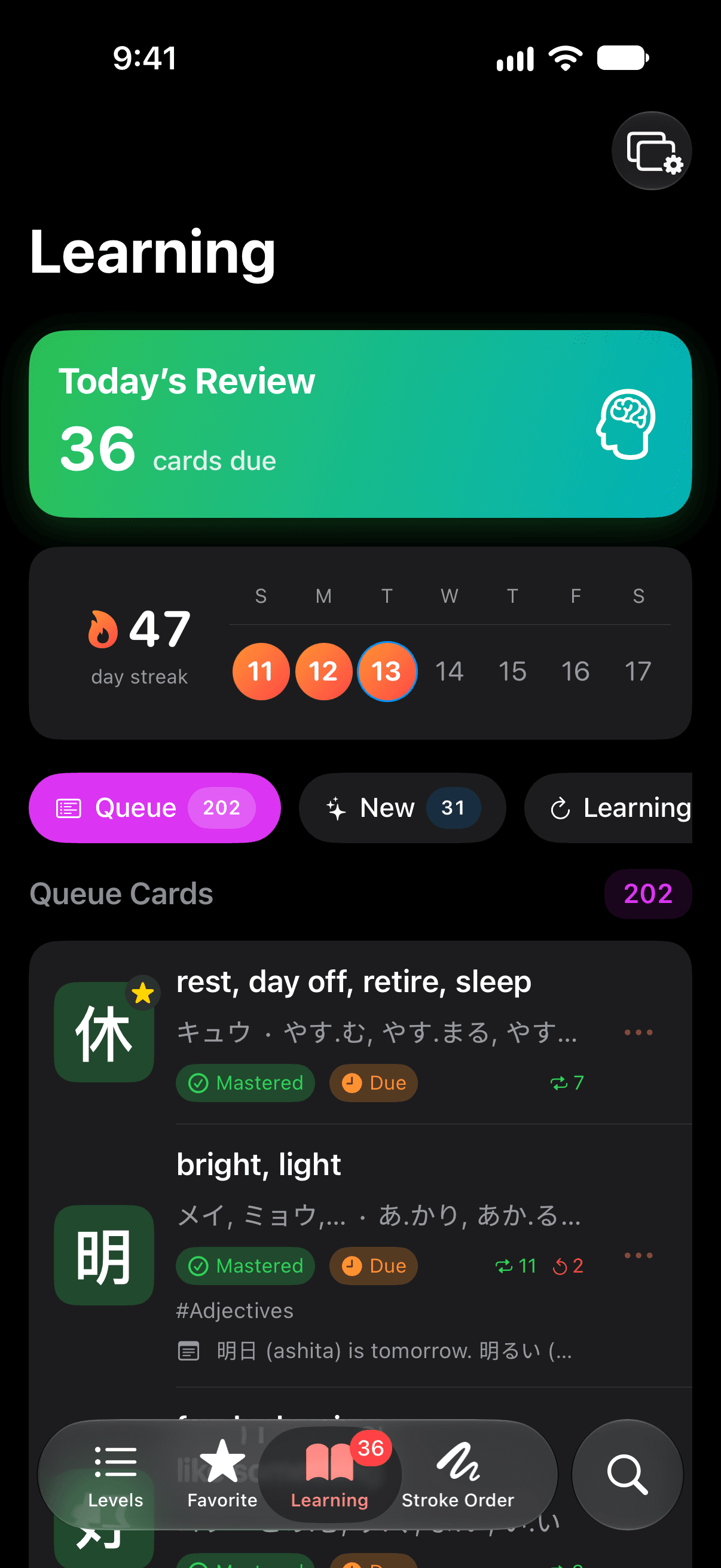
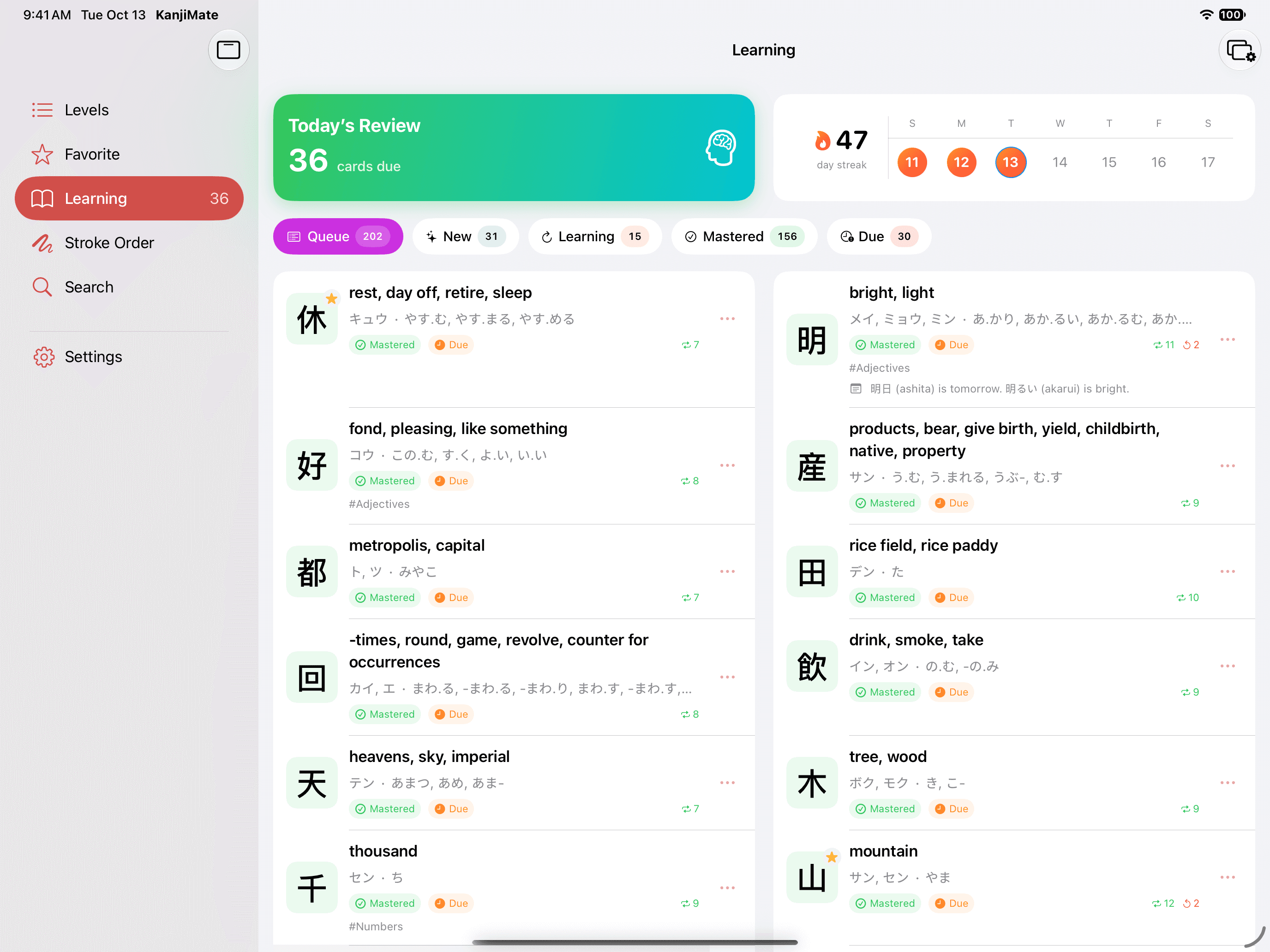
The Learning tab opens on Today's Review with the number of cards due, and your streak beside the week. Your deck is underneath, filtered by state.
Extra practice leaves the schedule alone
Difficult Cards, Learning Cards, Random Review, Preview New Cards and Practice by Group are practice only. Your due dates stay where they were.
Your own pace
Set how many new cards to take each day and a daily review goal: 20 and 200 to begin with. They are your settings, and you can keep going past the goal. No plan limits how much you study.
Streak Save
Study three days in a row to bank a save. Miss a single day, and finishing that day's due cards keeps your streak.
Kept in front of you, and kept in sync.
The small things that hold a daily habit together. All of them are part of the free app.
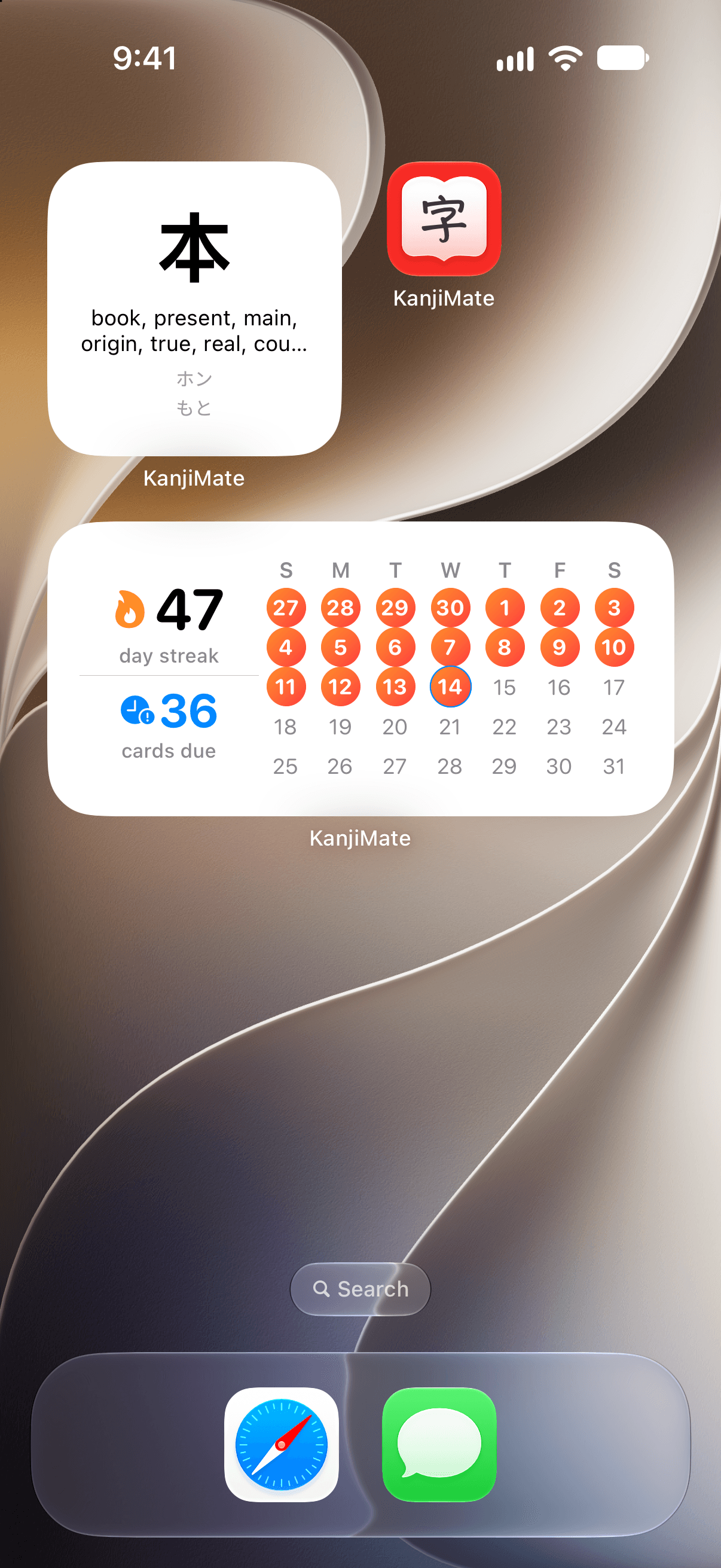
Home Screen and Lock Screen widgets
Study Streak shows your streak, the cards due and this month's study days. Other widgets show a kanji from your favorites or from your deck.
A daily reminder
Pick a time. The reminder stays quiet on a day you have already studied.
iCloud sync
Reviews, study history, favorites, notes, tags, groups and practice records sync between your iPhone and iPad through your own iCloud account. There is no KanjiMate account to create.
Achievements
A hundred levels across ten tracks, for streaks, reviews and handwriting. They are yours to earn without Premium.
Light, Dark or System
Pick an appearance, or let the app follow your device.
Free to read, free to start, one purchase for the rest.
The dictionary is free at every level, and so is the whole N5 course. Premium takes your study deck from N4 up to N1. You buy it once.
Free
$0
The whole dictionary, and the complete N5 course.
- All 2,230 kanji entries, from N5 to N1
- Stroke Animation and Practice Writing for every kanji
- Radicals, components and mnemonic stories
- Search, favorites and your own notes
- The N5 course: 103 kanji with Flashcard, Quiz and Draw
- FSRS scheduling, with no limit on how much you study
- Your streak, four key statistics and the last 7 days of history
- Achievements, widgets, reminders and iCloud sync
- No ads
Premium
$9.99 once
Everything in Free, and a study deck that goes all the way to N1.
- Add N4 to N1 kanji to your deck: 2,127 more
- Flashcard, Quiz and Draw with FSRS at every level
- Tags, and custom study groups built from them
- Progress charts, a yearly heatmap and a monthly calendar
- Your complete study history
Premium is a one-time lifetime purchase of $9.99, with no subscription and nothing to renew. The price is in USD on the US App Store, before local tax. Monthly and yearly subscriptions are no longer sold; one bought in an earlier version keeps working as before.
The reports Premium adds.
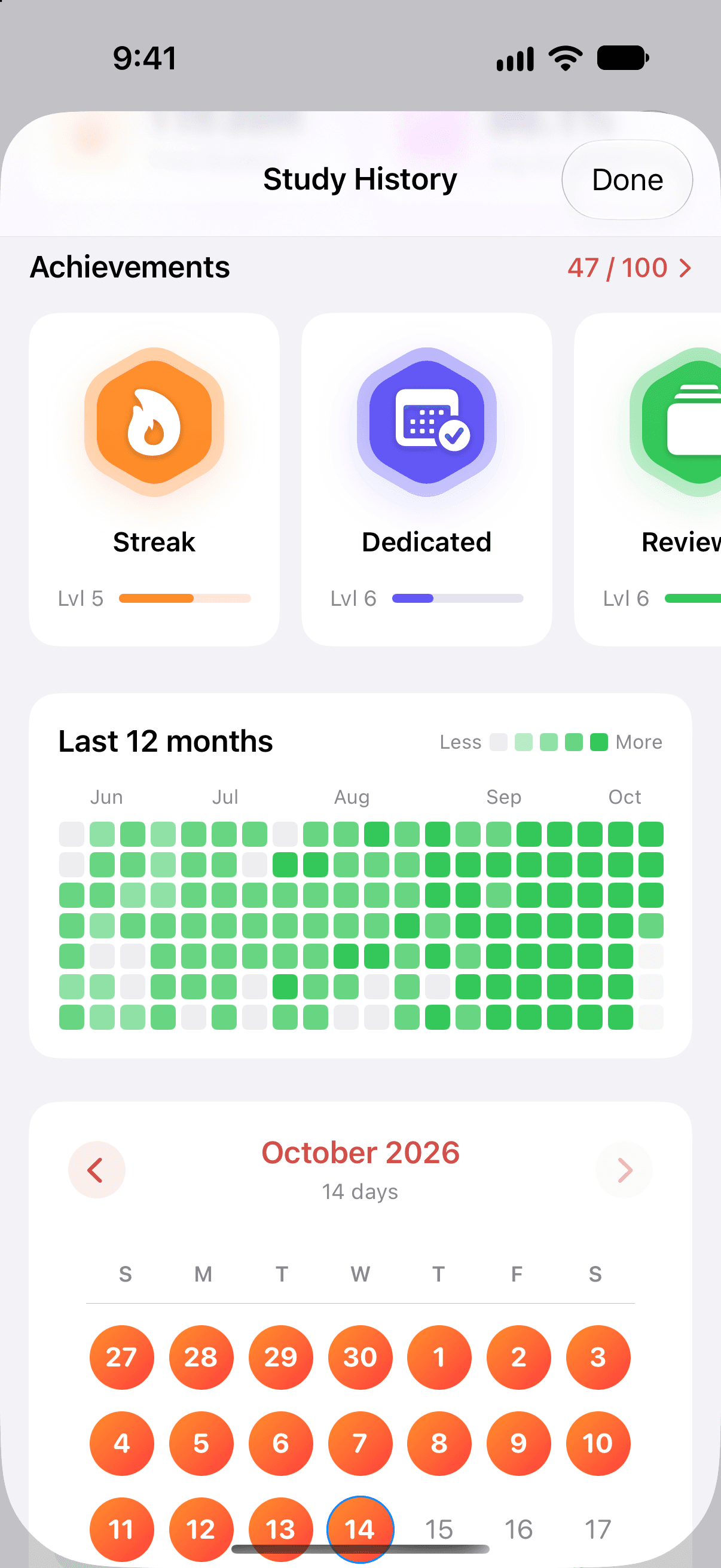
Study History is free as far as your streak, four statistics, your achievements and the last seven days. Premium opens the rest: a heatmap of the last twelve months, a monthly calendar, charts of cards, accuracy and time, and every past session.
Built for iPhone, iPad and iPhone Duo.
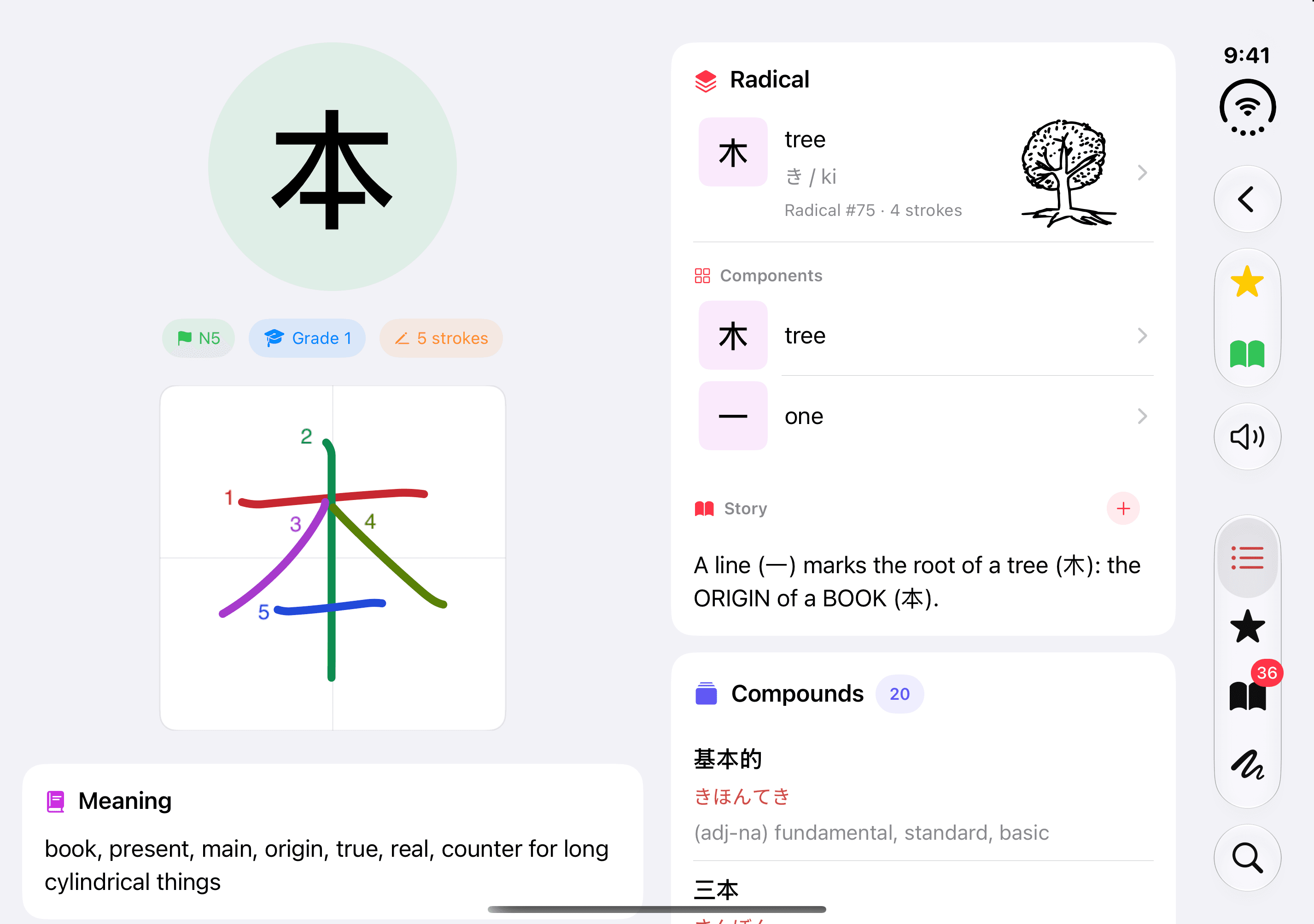
A native app for iOS 26 and later. When the screen is wide enough, as on an iPad in landscape or the inner screen of iPhone Duo, lists and details sit side by side.
Two columns on wide screens
Levels, Learning, Favorites, Search, Radicals, Tags and your groups show more at once. In an entry, the meaning and readings sit beside the radical, vocabulary and sentences.
A larger canvas on iPad
Practice Writing and Stroke Animation give you more room to write and to watch.
Pointer and Apple Pencil hover
Buttons, cards and rows highlight under a mouse, a trackpad or a hovering Apple Pencil.
Questions before you start.
Short answers about the kanji, the study method and what you pay.
What is KanjiMate?
KanjiMate is a kanji dictionary and study app for iPhone and iPad. It covers 2,230 kanji in the level groups commonly used for JLPT study, from N5 to N1, with meanings, readings, vocabulary, example sentences, stroke order, radicals and mnemonic stories. Every kanji is free to look up and the whole N5 level is free to study; Premium adds N4 to N1 to your study deck.
How much does KanjiMate cost?
KanjiMate is free to download and has no ads. The dictionary is free at every level, and so is the N5 course. Premium is a one-time lifetime purchase of $9.99, with no subscription. The price is in USD on the US App Store, before local tax.
What is free, and what does Premium add?
Free: every kanji entry, Stroke Animation and Practice Writing for every kanji, search, favorites, notes, widgets, reminders, iCloud sync, achievements, and the complete N5 course of 103 kanji with Flashcard, Quiz and Draw. Premium: adding N4 to N1 kanji to your deck, creating tags and custom study groups, and the advanced reports, which are progress charts, a 12-month heatmap, a monthly calendar and your complete study history.
Is KanjiMate Premium a subscription?
No. Premium is a one-time lifetime purchase with nothing to renew. Earlier versions also sold monthly and yearly subscriptions; those are no longer offered, and an existing one keeps working as before until you cancel it in your Apple Account settings.
Does KanjiMate have ads?
No. KanjiMate shows no advertising on either plan and contains no advertising SDK or ad tracker. Your study data is not used for advertising and is not sold.
Is there a daily limit on reviews?
No plan limits how much you study. Deck Settings lets you choose how many new cards to take each day, 20 to begin with, and a daily review goal, 200 to begin with. When you reach the goal you can keep going.
Which kanji are in each JLPT level?
KanjiMate uses four groups: Beginner (N5) with 103 kanji, Intermediate (N4) with 181, Advanced (N2–N3) with 739 and Expert (N1) with 1,207, which makes 2,230. They follow the level groupings commonly used for JLPT study. The JLPT does not publish an official kanji list for each level.
Does it show the stroke order of every kanji?
Yes. All 2,230 kanji have stroke order, and the Stroke Order tab goes further: 11,651 stroke diagrams, covering 6,421 kanji, hiragana and katakana, and 4,959 variant shapes and stroke orders, such as kaisho. Stroke Animation writes each one stroke by stroke, with every stroke numbered and in its own color, and you can step through it one stroke at a time. It is free for every kanji.
How is my handwriting scored?
In Practice Writing you write the kanji on screen and tap Check. The score is out of 100: 5 points for the right number of strokes, 20 for their order, 50 for the accuracy of each stroke and 25 for the shape of the whole character. Guide and Hint are there when you want them, and attempts made with them are recorded apart from attempts made without.
What is FSRS?
FSRS, the Free Spaced Repetition Scheduler, is a spaced repetition algorithm. It estimates how likely you are to still remember each card and schedules the next review for when that chance falls to your target, 90% unless you change it. A card you find easy comes back less often, and a card you forget comes back sooner.
Does it sync between my iPhone and iPad?
Yes, and it is free. Reviews, study history, favorites, notes, tags, groups and practice records sync through your own iCloud account. There is no separate account to create.
Does KanjiMate work offline?
Yes. The dictionary and your study data are stored on your device, so looking up, writing and reviewing kanji work without a connection. iCloud sync catches up when you are back online.
Which devices and languages does it support?
KanjiMate runs on iPhone and iPad with iOS 26 or iPadOS 26 or later, and it lays itself out in two columns on wide screens such as the inner screen of iPhone Duo. The interface is in English, and meanings are given in English. There is no Android or web version.
What is new in version 1.3?
Version 1.3 brings two-column layouts to wide screens, such as an iPad in landscape or the inner screen of iPhone Duo, and adds a grid of kanji tiles to every level. Practice Writing and Stroke Animation use a larger canvas on iPad, a long press in Stroke Order opens the animation or the practice canvas, and buttons, cards and rows highlight under a mouse, a trackpad or a hovering Apple Pencil.
Start with N5. It costs nothing.
Download KanjiMate and the whole dictionary is yours to read, with the complete N5 course to study. Go on to N4 when you are ready.
Download on the App StoreFor iPhone and iPad. Requires iOS 26 or later.
- No ads, on either plan
- No account: sync runs through your own iCloud
- No subscription: Premium is bought once
- The whole N5 course, free